> ## Documentation Index
> Fetch the complete documentation index at: https://greed.best/docs/llms.txt
> Use this file to discover all available pages before exploring further.
# Antinuke
> Set restrictions on your staff to prevent harm from being done on your server.
## What is antinuke?
Antinuke is a system to automatically set a limit of the amount of actions your staff can do. If that limit is exceeded, the staff will be punished and you'll stay safe from any harmful actions done to your server.
## Allowing users to edit the antinuke settings.
By default, only the **server owner** can manage the antinuke configuration. Using this feature, you can add other users to be able to configure the antinuke settings.
This is a risky command, as this will allow the user to be able to completely change the antinuke configuration.
```javascript Command theme={null}
,antinuke admin (@user)
```
```javascript Example theme={null}
,antinuke admin @fe3murs
```
![Image[1] 1](https://mintcdn.com/emogirlsllc/2F45fgNpsZGS7IGh/images/image%5B1%5D-1.png?fit=max&auto=format&n=2F45fgNpsZGS7IGh&q=85&s=279b13f5bc761d37a154d2609dd4639d) To **remove** an antinuke admin, you simply use the same `,antinuke admin ` command.
```javascript Command theme={null}
,antinuke admin (@user)
```
```javascript Example theme={null}
,antinuke admin @fe3murs
```
To **remove** an antinuke admin, you simply use the same `,antinuke admin ` command.
```javascript Command theme={null}
,antinuke admin (@user)
```
```javascript Example theme={null}
,antinuke admin @fe3murs
```
![Image[3] 3](https://mintcdn.com/emogirlsllc/2F45fgNpsZGS7IGh/images/image%5B3%5D-3.png?fit=max&auto=format&n=2F45fgNpsZGS7IGh&q=85&s=5eb287efa341f4c9607e0d0519a94196) You can quickly view all antinuke admins using the `,antinuke admin list` command.
## Whitelisting users from the antinuke
By default, **everyone** is subject to being affected by the antinuke. To exempt a user, simply whitelist them using the `,antinuke whitelist` command.
This is a risky command, as it allows the user to completely bypass all antinuke restrictions.
```javascript Command theme={null}
,antinuke whitelist (userid)
```
```javascript Example theme={null}
,antinuke whitelist (userid)
```
You can quickly view all antinuke admins using the `,antinuke admin list` command.
## Whitelisting users from the antinuke
By default, **everyone** is subject to being affected by the antinuke. To exempt a user, simply whitelist them using the `,antinuke whitelist` command.
This is a risky command, as it allows the user to completely bypass all antinuke restrictions.
```javascript Command theme={null}
,antinuke whitelist (userid)
```
```javascript Example theme={null}
,antinuke whitelist (userid)
```
![Image[1]](https://mintcdn.com/emogirlsllc/873VqGQc6vpUqgAz/images/Screenshot-2026-06-07-1007100.png?fit=max&auto=format&n=873VqGQc6vpUqgAz&q=85&s=986d792ae837a0870897af578076d44d "Image[1]")
![Image[1]](https://mintcdn.com/emogirlsllc/873VqGQc6vpUqgAz/images/Screenshot-2026-06-07-100717.png?fit=max&auto=format&n=873VqGQc6vpUqgAz&q=85&s=31e28c34fc58544d6391c39a45fdc75f "Image[1]") To **remove** users from the whitelist, simply use the same `,antinuke whitelist` command.
```javascript Command theme={null}
,antinuke whitelist (userid)
```
```text theme={null}
```
```javascript Example theme={null}
,antinuke whitelist (userid)
```
To **remove** users from the whitelist, simply use the same `,antinuke whitelist` command.
```javascript Command theme={null}
,antinuke whitelist (userid)
```
```text theme={null}
```
```javascript Example theme={null}
,antinuke whitelist (userid)
```
![Image2[1]](https://mintcdn.com/emogirlsllc/dwR09Angh5Bfu67g/images/Screenshot-2026-06-07-101618.png?fit=max&auto=format&n=dwR09Angh5Bfu67g&q=85&s=9632ce1f6db2598fc22f3a2b9b87e554) You can view all whitelisted users by using the `,antinuke list` command.
## Configuring the antinuke
Configure the antinuke simply by using these commands. Use `,antinuke` to view the antinuke settings at anytime. **Make sure to toggle on antinuke using** `,antinuke enable`
## Setting up antinuke modules.
Antinuke has various modules that you can configure to protect your server.
### Available Module
You can view all whitelisted users by using the `,antinuke list` command.
## Configuring the antinuke
Configure the antinuke simply by using these commands. Use `,antinuke` to view the antinuke settings at anytime. **Make sure to toggle on antinuke using** `,antinuke enable`
## Setting up antinuke modules.
Antinuke has various modules that you can configure to protect your server.
### Available Module
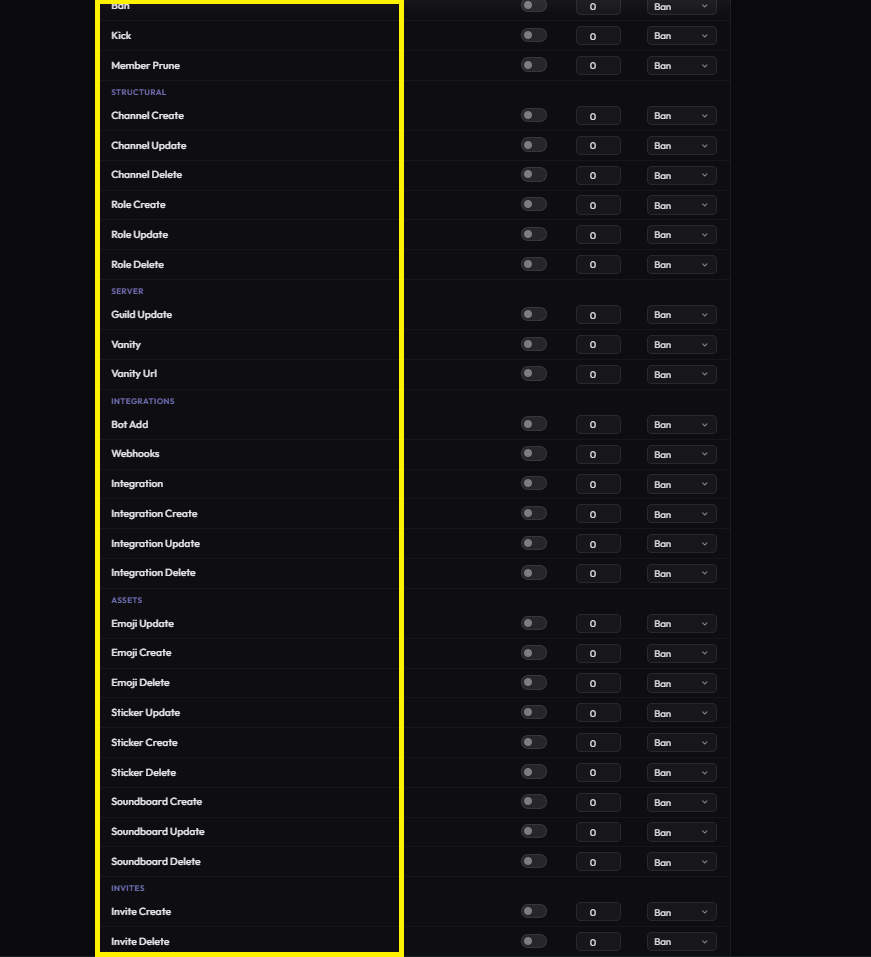 Protect your server from unauthorized administrative changes.
* `guildupdate` - Changes to name, region, icon, or settings.
* `webhooks` - Creation or usage of webhooks.
* `vanityurl` - Changes to the server vanity URL.
* `integrationcreate` - Adding new integrations/bots.
* `integrationupdate` - Modifying existing integrations.
* `integrationdelete` - Removing integrations.
* **Usage Example:**
```javascript Command theme={null}
,antinuke guildupdate (status) [flags]
```
```javascript Example theme={null}
,antinuke guildupdate on (flags)
```
Prevent mass-kicks, bans, or unauthorized bot additions.
* `botadd` - When a bot is added by a non-whitelisted user.
* `kick` - Limits the number of members a staff can kick.
* `ban` - Limits the number of members a staff can ban.
* `memberprune` - Unauthorized server pruning actions.
* **Usage Example:**
```javascript Command theme={null}
,antinuke ban (status) [flag]
```
```javascript Example theme={null}
,antinuke ban on --do ban --threshold 3 --command on
```
Secure your server structure from deletion or manipulation.
* `rolecreate` / `roleupdate` / `roledelete`
* `channelcreate` / `channelupdate` / `channeldelete`
* **Usage Example:**
```javascript Command theme={null}
,antinuke channel (status) [flags]
```
```javascript Example theme={null}
,antinuke channel on --do kick --threshold 5
```
Protect your server's creative assets and engagement tools.
* `emojicreate` / `emojiupdate` / `emojidelete`
* `stickercreate` / `stickerupdate` / `stickerdelete`
* `soundboardcreate` / `soundboardupdate` / `soundboarddelete`
* `invitecreate` / `invitedelete`
* **Usage Example:**
```javascript Command theme={null}
,antinuke invite (status) [flags]
```
```javascript Example theme={null}
,antinuke invite on (flags)
```
within the greed [dashboard](https://greed.best/dashboard) only
Firstly, toggle your antinuke on.
```javascript Command theme={null}
,antinuke ban (status) [flags]
```
```javascript Example theme={null}
,antinuke ban on (flags)
```
Next, set the punishment for your modules.
```javascript Command theme={null}
,antinuke (module) (status) (punishment)
```
```javascript Example theme={null}
,antinuke botadd on --do kick
```
Now, set the threshold.
A higher threshold means the user must do more of a specific action to trigger the antinuke.
```javascript Command theme={null}
,antinuke (module) threshold (threshold)
```
```javascript Example theme={null}
,antinuke botadd on --do kick --threshold 2
```
If you want, you can view settings for a module using the following commands:
```javascript Command theme={null}
,antinuke config
```
```javascript Example theme={null}
,antinuke config
```
Alternatively, you can simply use `,antinuke (module)`.
Protect your server from unauthorized administrative changes.
* `guildupdate` - Changes to name, region, icon, or settings.
* `webhooks` - Creation or usage of webhooks.
* `vanityurl` - Changes to the server vanity URL.
* `integrationcreate` - Adding new integrations/bots.
* `integrationupdate` - Modifying existing integrations.
* `integrationdelete` - Removing integrations.
* **Usage Example:**
```javascript Command theme={null}
,antinuke guildupdate (status) [flags]
```
```javascript Example theme={null}
,antinuke guildupdate on (flags)
```
Prevent mass-kicks, bans, or unauthorized bot additions.
* `botadd` - When a bot is added by a non-whitelisted user.
* `kick` - Limits the number of members a staff can kick.
* `ban` - Limits the number of members a staff can ban.
* `memberprune` - Unauthorized server pruning actions.
* **Usage Example:**
```javascript Command theme={null}
,antinuke ban (status) [flag]
```
```javascript Example theme={null}
,antinuke ban on --do ban --threshold 3 --command on
```
Secure your server structure from deletion or manipulation.
* `rolecreate` / `roleupdate` / `roledelete`
* `channelcreate` / `channelupdate` / `channeldelete`
* **Usage Example:**
```javascript Command theme={null}
,antinuke channel (status) [flags]
```
```javascript Example theme={null}
,antinuke channel on --do kick --threshold 5
```
Protect your server's creative assets and engagement tools.
* `emojicreate` / `emojiupdate` / `emojidelete`
* `stickercreate` / `stickerupdate` / `stickerdelete`
* `soundboardcreate` / `soundboardupdate` / `soundboarddelete`
* `invitecreate` / `invitedelete`
* **Usage Example:**
```javascript Command theme={null}
,antinuke invite (status) [flags]
```
```javascript Example theme={null}
,antinuke invite on (flags)
```
within the greed [dashboard](https://greed.best/dashboard) only
Firstly, toggle your antinuke on.
```javascript Command theme={null}
,antinuke ban (status) [flags]
```
```javascript Example theme={null}
,antinuke ban on (flags)
```
Next, set the punishment for your modules.
```javascript Command theme={null}
,antinuke (module) (status) (punishment)
```
```javascript Example theme={null}
,antinuke botadd on --do kick
```
Now, set the threshold.
A higher threshold means the user must do more of a specific action to trigger the antinuke.
```javascript Command theme={null}
,antinuke (module) threshold (threshold)
```
```javascript Example theme={null}
,antinuke botadd on --do kick --threshold 2
```
If you want, you can view settings for a module using the following commands:
```javascript Command theme={null}
,antinuke config
```
```javascript Example theme={null}
,antinuke config
```
Alternatively, you can simply use `,antinuke (module)`.