The new dashboard
This is the biggest update greed has had. The dashboard was rebuilt from the ground up, almost every command now has a page there, and a few things only exist on the web.
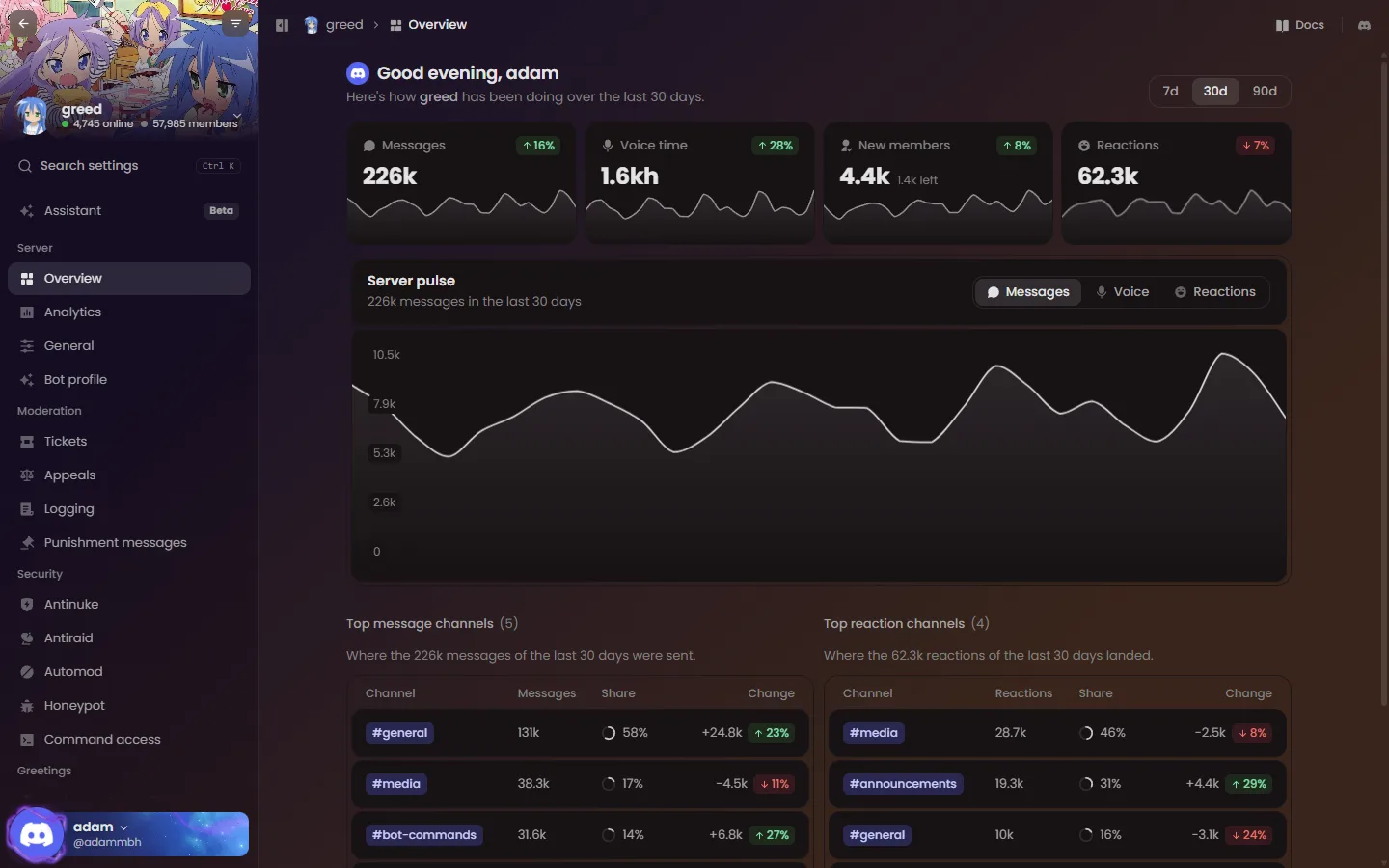
A rebuilt dashboard
The overview shows how your server is doing at a glance: messages, voice time, new members and reactions, with a chart you can switch between them and your busiest channels. Pick the last 7, 30 or 90 days.
- A cleaner sidebar. Pages are grouped into clear categories, and related features share one page with tabs. Drag the categories into your own order with Arrange categories, hide the sidebar with
Ctrl Bor resize it by dragging its edge. - A new server switcher with search, online and member counts and an "Add greed to a server" shortcut.
- Members by name. People show as names with avatars instead of raw ids, with a profile card when you click one.
- Works on your phone. Dropdowns, dialogs and pickers open as bottom sheets, and long tab rows scroll.
- Limits up front. You see how many auto roles, starboards, feeds and so on you can add before you hit the limit, and every removal asks first.
Search everything
Search settings (Ctrl K) finds any page, tab or setting, including your own account settings. It ignores plurals, hyphens and spacing and knows common nicknames, so anti afk, jtc, temp vc or bad words all land on the right place. Press Enter to open the top result.
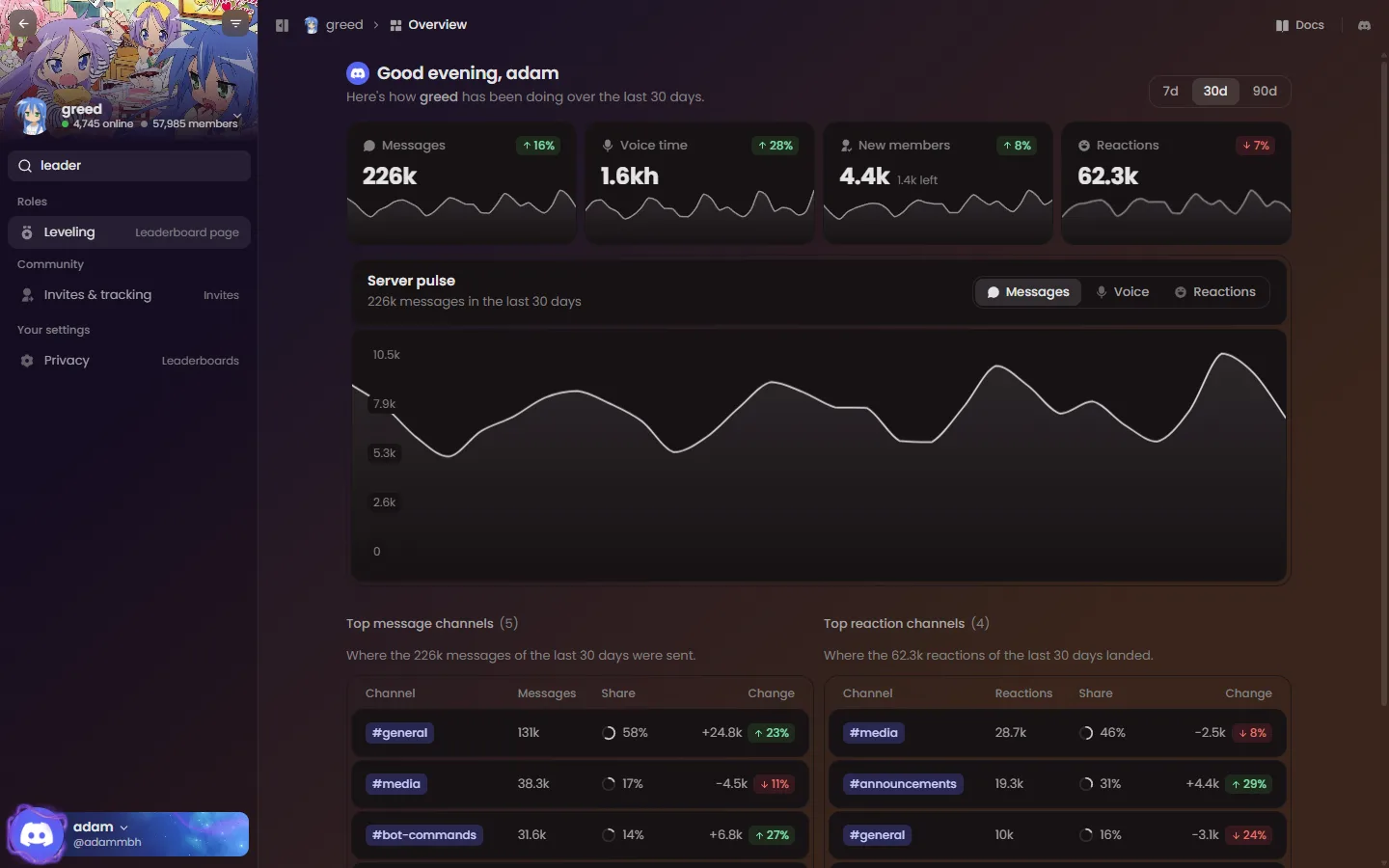
The greed Assistant
Tell greed what you want in plain words and it does the setup for you: create channels and roles, set up VoiceMaster, fix permissions or explain what is configured.
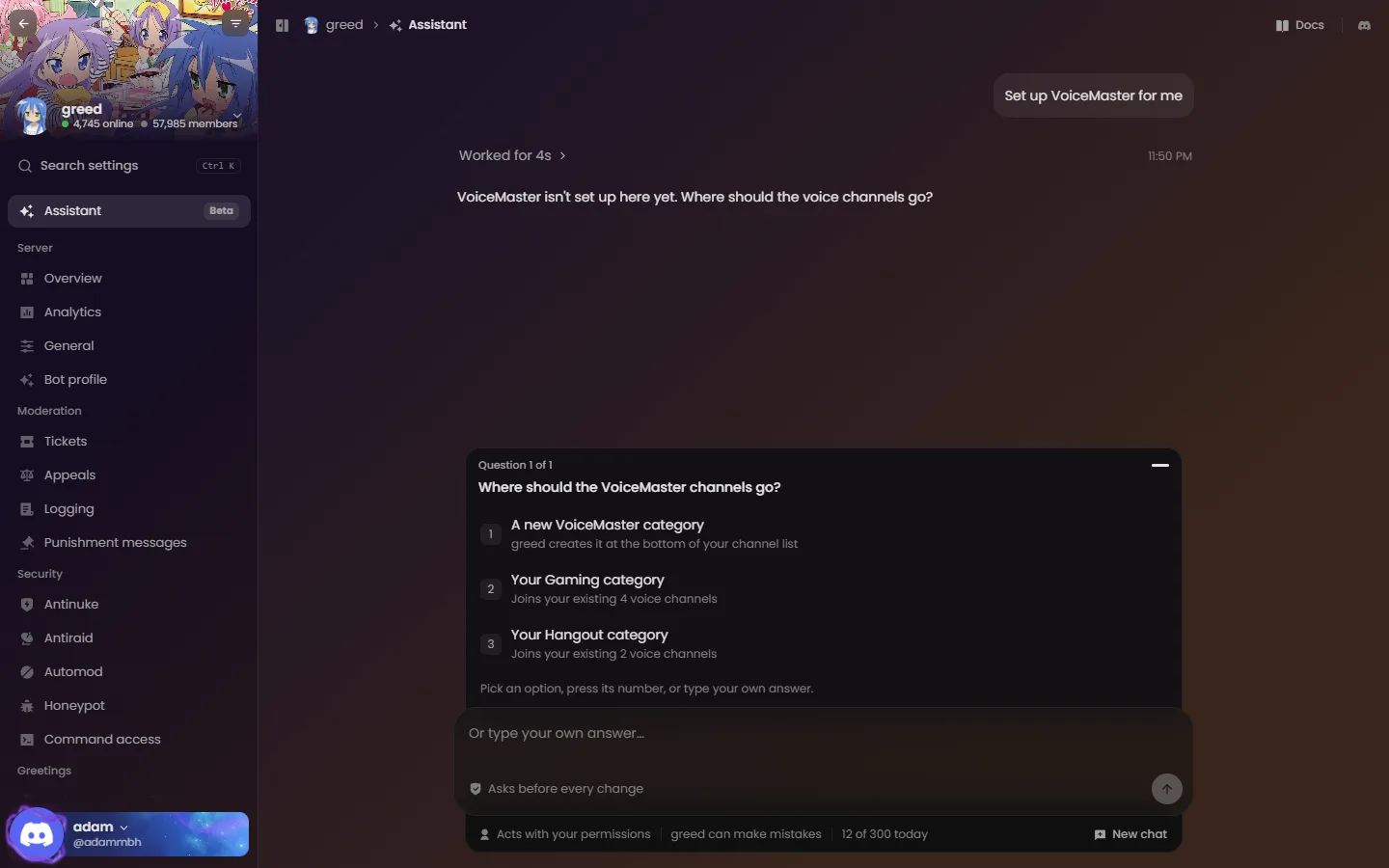
- Nothing changes without you. The Assistant shows every change it plans, with a before and after, and only runs it when you press Approve.
- It acts with your permissions, never more. Each step is checked again right before it runs: your permissions, greed's permissions, role order, raids and your antinuke limits. It can't delete, ban, kick, send messages or hand out admin permissions.
- It asks when it isn't sure, with numbered choices you can pick from, and links the docs page it used.
- It covers most dashboard pages, and can change settings on 16 of them, from greetings and autoroles to leveling and VoiceMaster.
The Assistant is in beta and available to Server Premium servers for now, with 300 messages a day per server and 40 an hour per member.
Themes
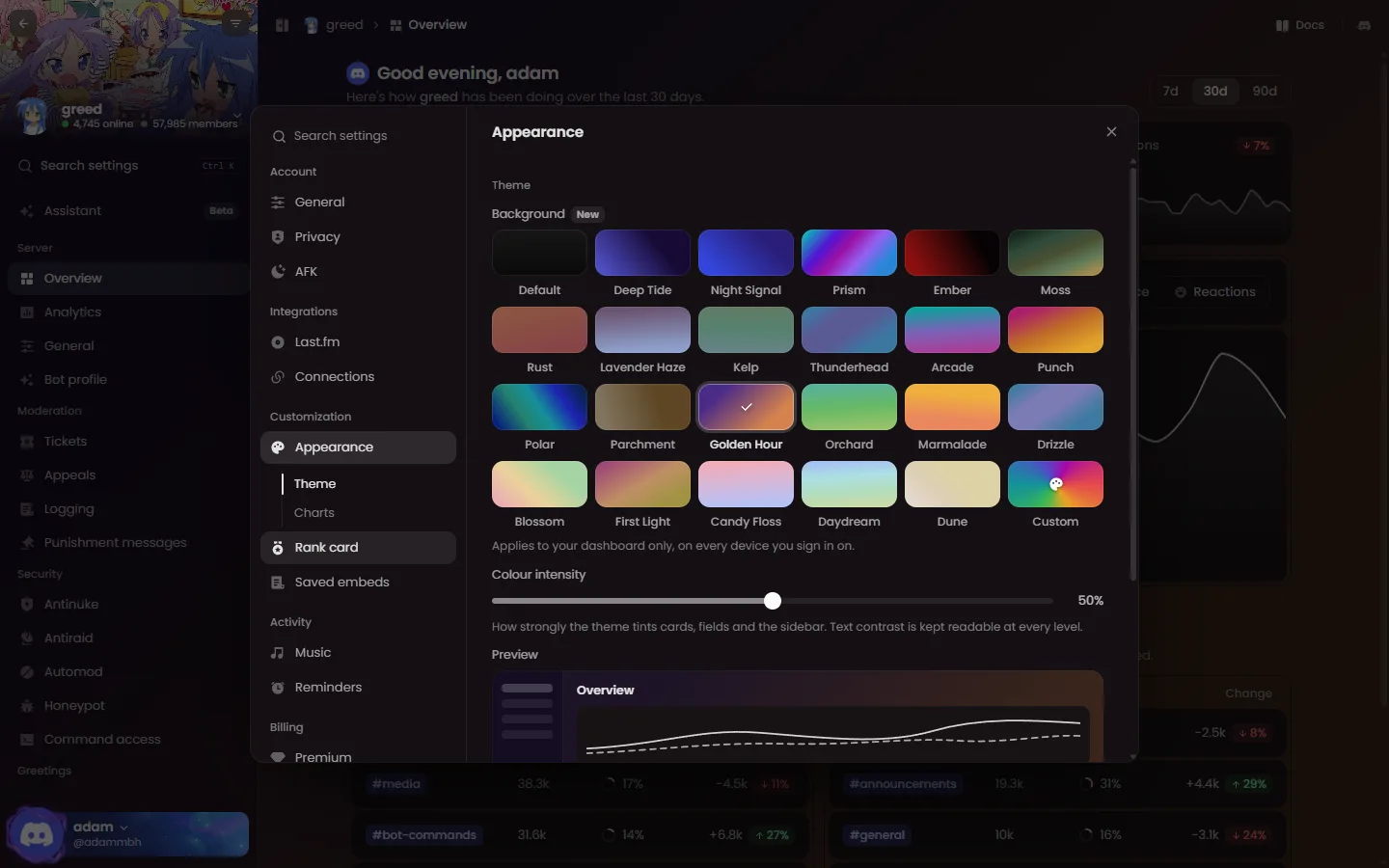
Make the dashboard yours under Settings → Appearance. Pick one of 22 gradients or build your own with up to five colours, a direction and how strongly it tints cards and the sidebar. Text stays readable at every setting, and charts can take on your theme's colours too. Your theme follows you to every device and only changes your own view.
Leaderboard pages
Your server can now have its own leaderboard on the website, with a podium for the top three, level rings and Total, Text and Voice boards for all time, this month and this week.
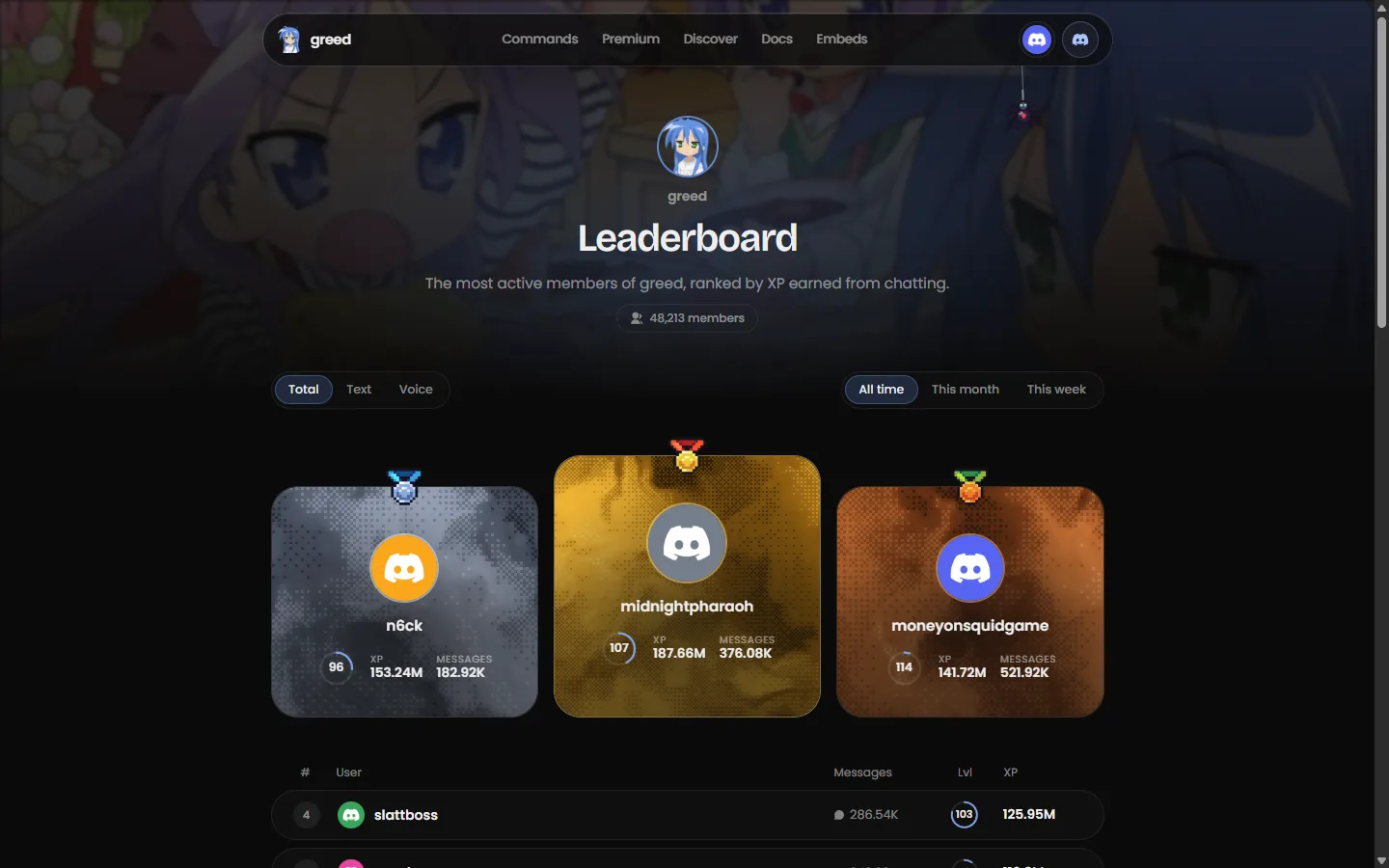
- Turn it on under Levels → Leaderboard page. It lives at
greed.best/leaderboard/<server id>, or at a custom link like/leaderboard/your-serverwith Server Premium. - Choose who can see it (anyone with the link, or members only), which boards and columns show, a minimum level, how many members are listed, an accent colour and the banner.
- Anyone can find a server's page from greed.best/leaderboard.
- Don't want to be listed?
,level hide(or Settings → Privacy) takes you off every public leaderboard page. Your XP keeps counting, and,level hideis undone with,level unhide.
Leveling, all on one page
Every ,level setting is on the dashboard now, split into Leveling, Rewards, Bonuses, Rank card and Leaderboard page.
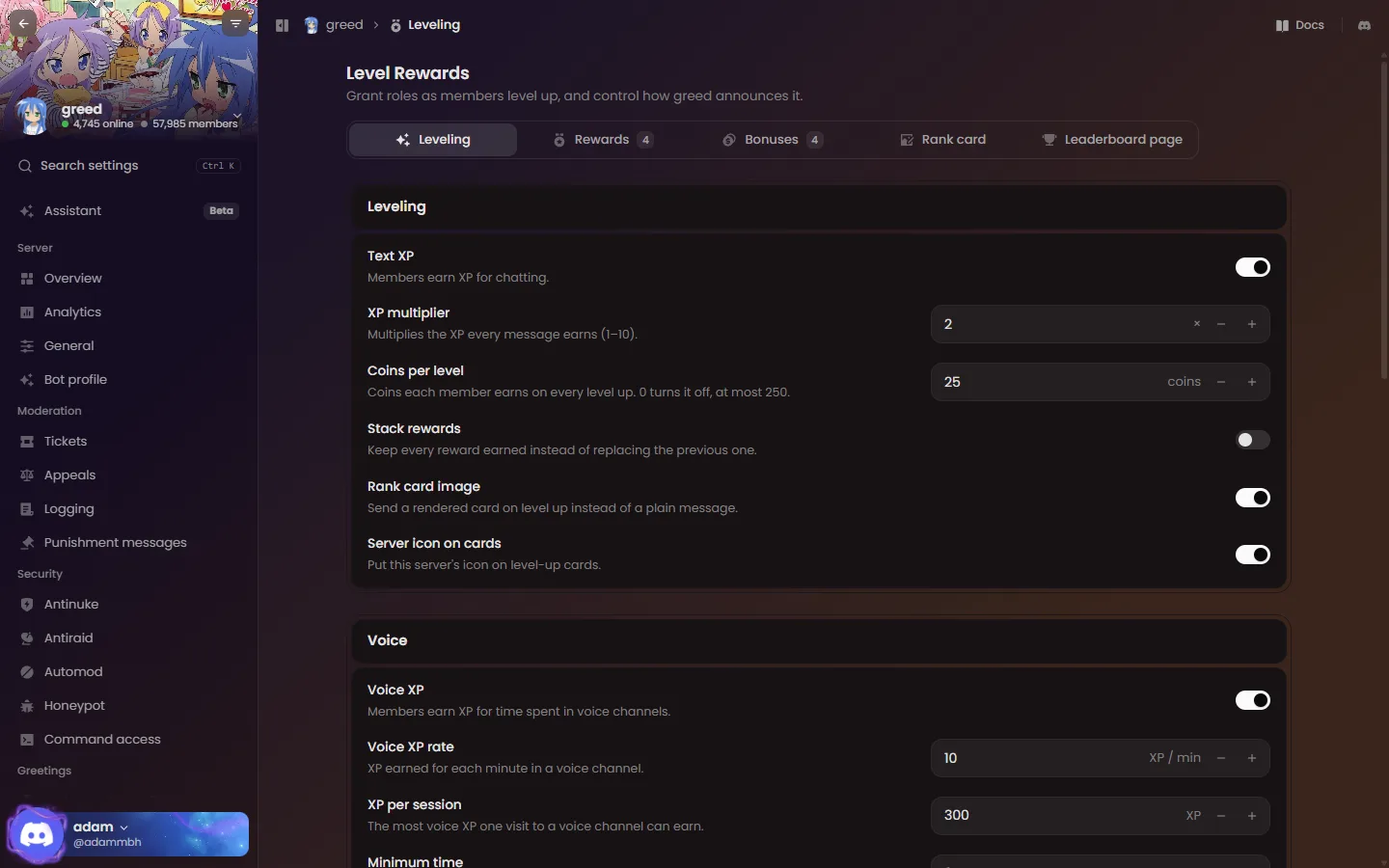
- Coins per level, Anti-AFK, ignored channels and roles, XP decay and voice XP rates.
- Start or end an XP event with a multiplier and a duration.
- XP multipliers per role or channel, and milestones that give coins, a role or both.
- Sync roles re-applies every level reward to every member, like
,level sync. - The XP rate accepts decimals such as
0.5.
Bot profile
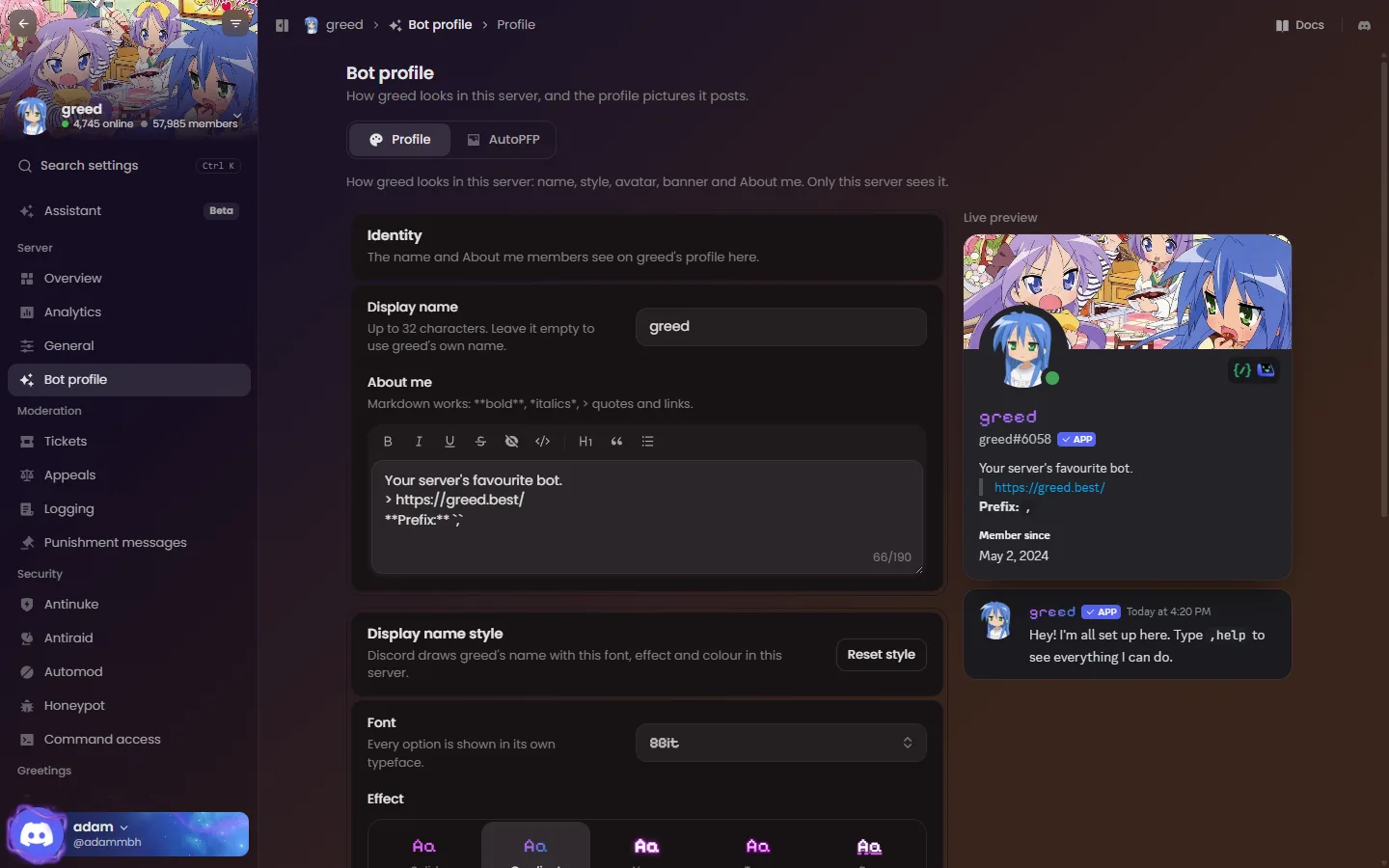
See greed exactly as your members will, with a live Discord-style preview. Set the display name, font, effect and colours, write the About me with a formatting toolbar, and upload a custom avatar and banner (GIFs stay animated).
Your account settings
Click your name to open Settings, a window for everything about your own account, with its own search:
- General and Privacy: language, timezone, prefix, birthday, help style, avatar history, family requests, roleplay stats, leaderboard opt-out and where missed mentions go.
- AFK, Last.fm, Music, Reminders and Premium.
- Saved embeds: create, edit and delete them, or open one in the embed builder and save straight back to it.
- Lookup API: your plan and a new key when you need one.
Linked accounts on userinfo
userinfo has a new card with Overview, Roles and Assets tabs, and shows the accounts you have linked.
- haunt.gg: connect from Settings → Connections or with
,bio haunt connect. - guns.lol: enter your username in Connections or use
,bio guns connect <username>. Your guns.lol profile must be linked to the same Discord account, so nobody can claim yours. ,bio gunsand,bio hauntnow show each profile's real badges.- Each account can be linked to one Discord account, and you can disconnect at any time.
Logging in
Logging in has its own page, with a preview of the dashboard. Joining the greed support server is now a choice on that page instead of happening automatically.
Marriage and family
Run /family marry @member (or ,marry) to propose. They get a card with Accept and Decline, and you can withdraw it with Cancel. Proposals expire after 10 minutes.
- You can be married to one person at a time, and can't marry someone you're related to by blood. In-laws are fine.
/family divorceends the marriage after you confirm. Your children stay with you./family adopt @member(or,adopt) offers to be someone's parent: up to 5 children, or 15 with User Premium. A member has one parent, and you can't adopt your partner or anyone above you./family disown @childremoves a child, and/family runawayleaves your parent's family./familyshows your partner, parent, children and siblings,/family treedraws your whole family as an image, and/family relationship @usertells you how you're related./family proposals offand/family adoptions offstop offers reaching you, and/family leaveclears everything in one step after you confirm.
Marriages from the old greed carry over automatically.
Ticket transcripts on the web
Every transcript greed posts to your ticket log has a View on web button. The page shows the ticket the way it looked in Discord: embeds, buttons, attachments, stickers, reactions, replies and edits. Only the person who opened the ticket, members with Manage Server and the support and trainee roles of that ticket's option can open it, after signing in with Discord. Transcripts saved before this update keep their attached file.
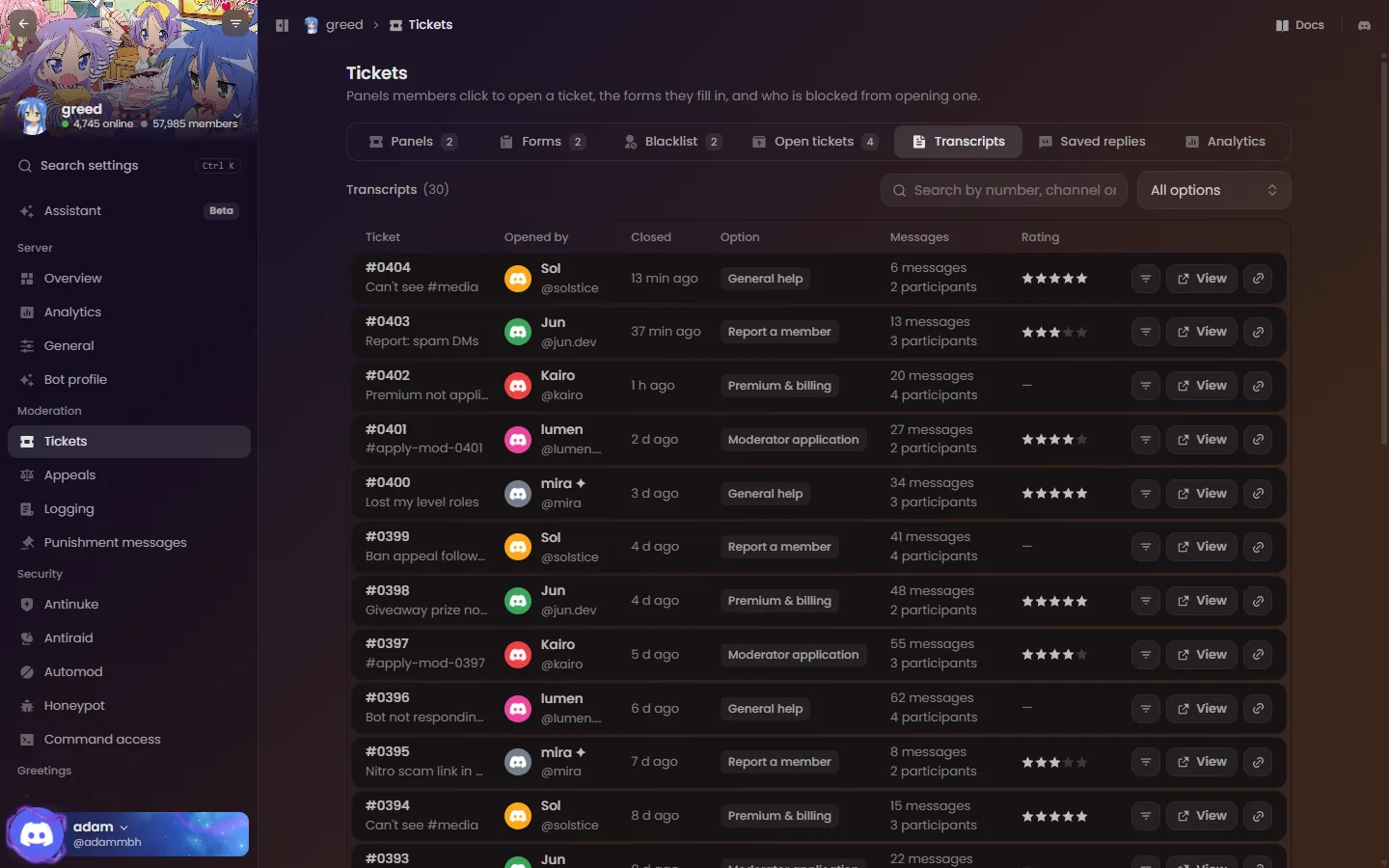
On the dashboard, the new Tickets → Transcripts tab lists every saved ticket. Search by number, channel or member, filter by option, and open a transcript or copy its link.
Last.fm
- Typing
.fmon its own shows what you are listening to, in any server, once your Last.fm is linked.,fmand your custom command still work. - The reactions you set with
,lastfm reactappear on every now-playing post, including,fmand/fm. ,lastfm playingchecks every linked member in the server (up to 120 at a time) instead of a small sample.
Moderation
,unban all,,filter clear,,warn clear,,denyperm clearand,fakepermissions resetask you to confirm first.,unban allcovers every ban and tells you how many were unbanned, failed or skipped.- New
,hardban listand,nickname force list. - Moderation approvals can be set up in
/configure→ Moderation. - Antinuke limits are only shown to the server owner and antinuke admins.
- A warn timeout punishment needs a duration between 1 minute and 28 days, so it always takes effect.
Games
,ttt @membersends a challenge with Accept and Decline. The board shows its final state when a game ends, is cancelled or times out.- Timed-out blackjack, mines, high-low and ladder games show their result on the board.
More on the dashboard
- VoiceMaster: add extra join-to-create hubs (Server Premium) and set a default region.
- Onboarding has a VoiceMaster step and previews of the dashboard next to every step.
- Tickets: every option setting is editable, including button colour, channel names, cooldowns and every message.
- Greetings can post to extra channels with their own message (Server Premium).
- Logging, Starboard, Feeds, Discovery, Invites, AutoPFP and the security pages gained the settings that were only available as commands.
- A new emoji picker with your server's emoji, search and recently used.
Quality of life
- Replies, buttons and cards use greed's own icons instead of standard emoji. Reactions you click (polls, game joins, pagination) stay standard so everyone can use them.
- Confirmation buttons expire after 10 minutes and only work once. Expired page buttons say so.
- Clicking someone else's buttons tells you whose they are.
- A prefix command with a missing or wrong argument shows its usage and an example.
- A command you can't use tells you about the permission first instead of asking for arguments.
,searchonly shows messages from channels you can read.- Long AI and OCR results arrive as a text file, and
,ai transcribeworks on a replied-to voice message. - Script buttons support
emoji:, andtimezone unsetclears your timezone. ,sticker removeandrenamework on a reply to a message with the sticker.,level channelwith no channel stops level-ups from posting in a channel.- When Discord is too busy to take a command, greed asks you to try again in a moment instead of showing an error code.
Fixes
- Music reconnects to its server on its own after a brief network drop.
enableanddisableon join DMs, invite tracking, Auto-Mix and server tag rewards set the state directly instead of toggling it.,loopon its own shows the current mode instead of turning looping off.- Removing or renaming an emoji or sticker, deleting a role and hardbans tell you when Discord refuses instead of claiming success.
,sticky addno longer posts a sticky when you are at your limit, and,nukeno longer leaves two copies of a channel behind.- Twitch live alerts no longer stop after a temporary database error, and feed workflows receive the post's link.
- The blacktea and flags join messages no longer show
:alarm_clock:as text. - Settings pointing at deleted roles or channels are cleaned up instead of breaking a dashboard page.